Social Media Audio Downloader & Manager

Download, Organize, and Manage
Social Media Audio in One Place

YouAudioDown is a modern social media audio downloader SaaS built for users who want more control over their saved audio. Download audio from social media links, manage your files in a clean dashboard, track download progress, organize playlists, and view useful statistics — all from one simple platform.

4.9
2,400+ ratings
"Finally, a tool that actually works" — Sarah M.
"The dashboard is incredible" — Mike R.
"Game changer for creators" — Emma L.
8+
Platforms Supported
50K+
Audio Downloads
4.9
User Rating
Free
No Account Needed
Trusted by creators & teams worldwide
YouTube
Instagram
TikTok
Twitter
Facebook
SoundCloud
Spotify
Pinterest
Snapchat
LinkedIn
Vimeo
Dailymotion
YouTube
Instagram
TikTok
Twitter
Facebook
SoundCloud
Spotify
Pinterest
Snapchat
LinkedIn
Vimeo
Dailymotion
Platform Features

Everything You Need to Manage Social Media Audio

Eight powerful features designed to give you full control over your audio downloads, organization, and activity tracking.

Dashboard

Your Complete Social Media Audio Downloader Dashboard

YouAudioDown gives you more than a download button. It provides a full dashboard where you can manage your audio downloads, saved files, playlists, channel sources, account settings, and usage data — all from one central hub.

Everything is designed to be simple, fast, and easy to understand, even if you are not a technical user.

View recent download activity at a glance
Access your audio library in one click
Monitor active download tasks in real time
Check account usage and storage insights
Navigate to every tool from one screen
YouAudioDown Dashboard
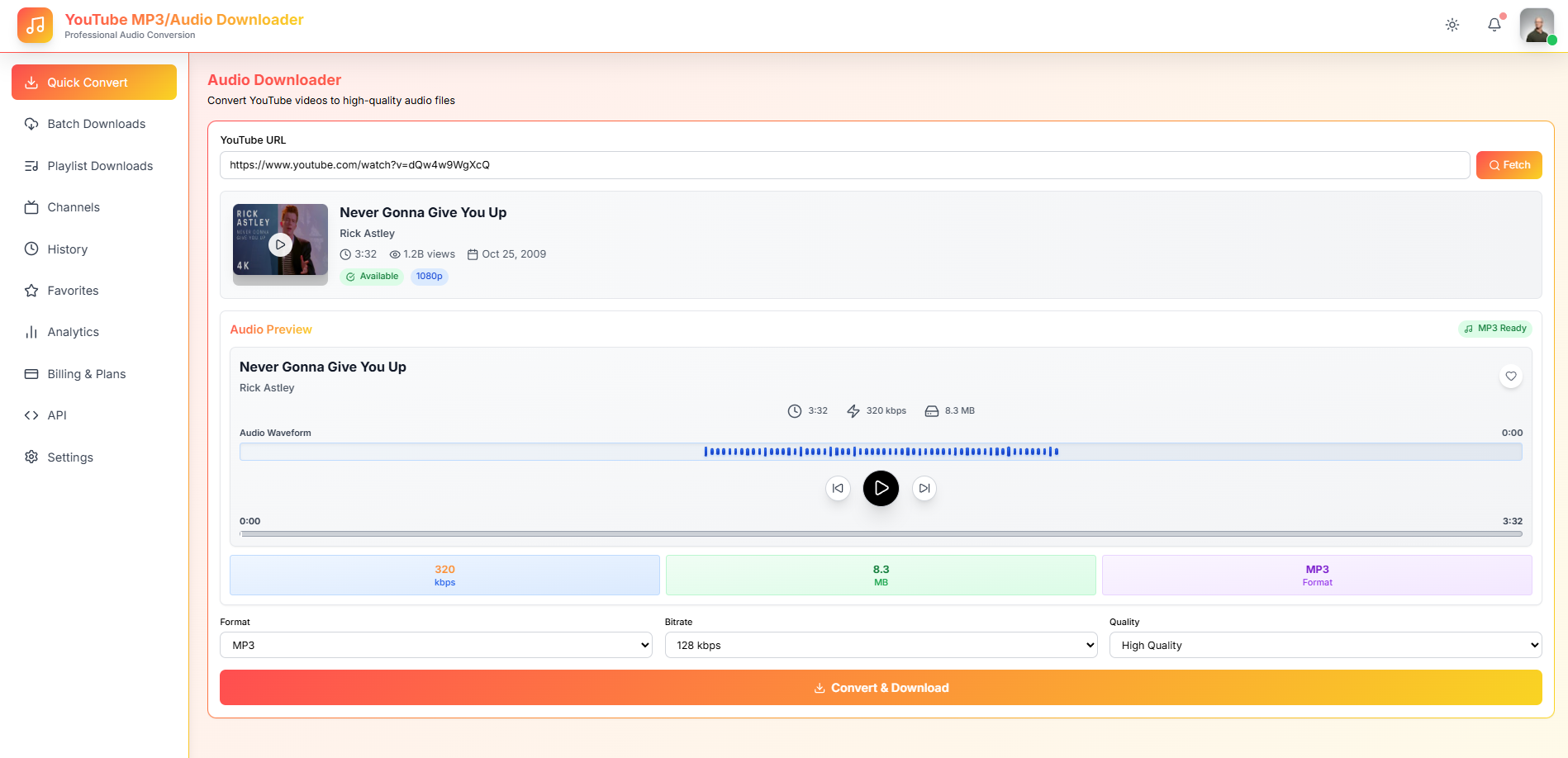
Download

Download Audio from Social Media Links

With the Download feature, you can paste a supported social media video link and extract the audio in just a few clicks. YouAudioDown is built to make the download process smooth, fast, and beginner-friendly.

Simply copy the video URL, paste it into the download box, and let the platform process the audio for you. No software or technical knowledge required.

Paste links from YouTube, Instagram, TikTok, and more
Convert videos into high-quality audio files
Download audio for offline listening anytime
Save audio directly to your personal library
Keep every download organized inside your account
Download Audio from Social Media
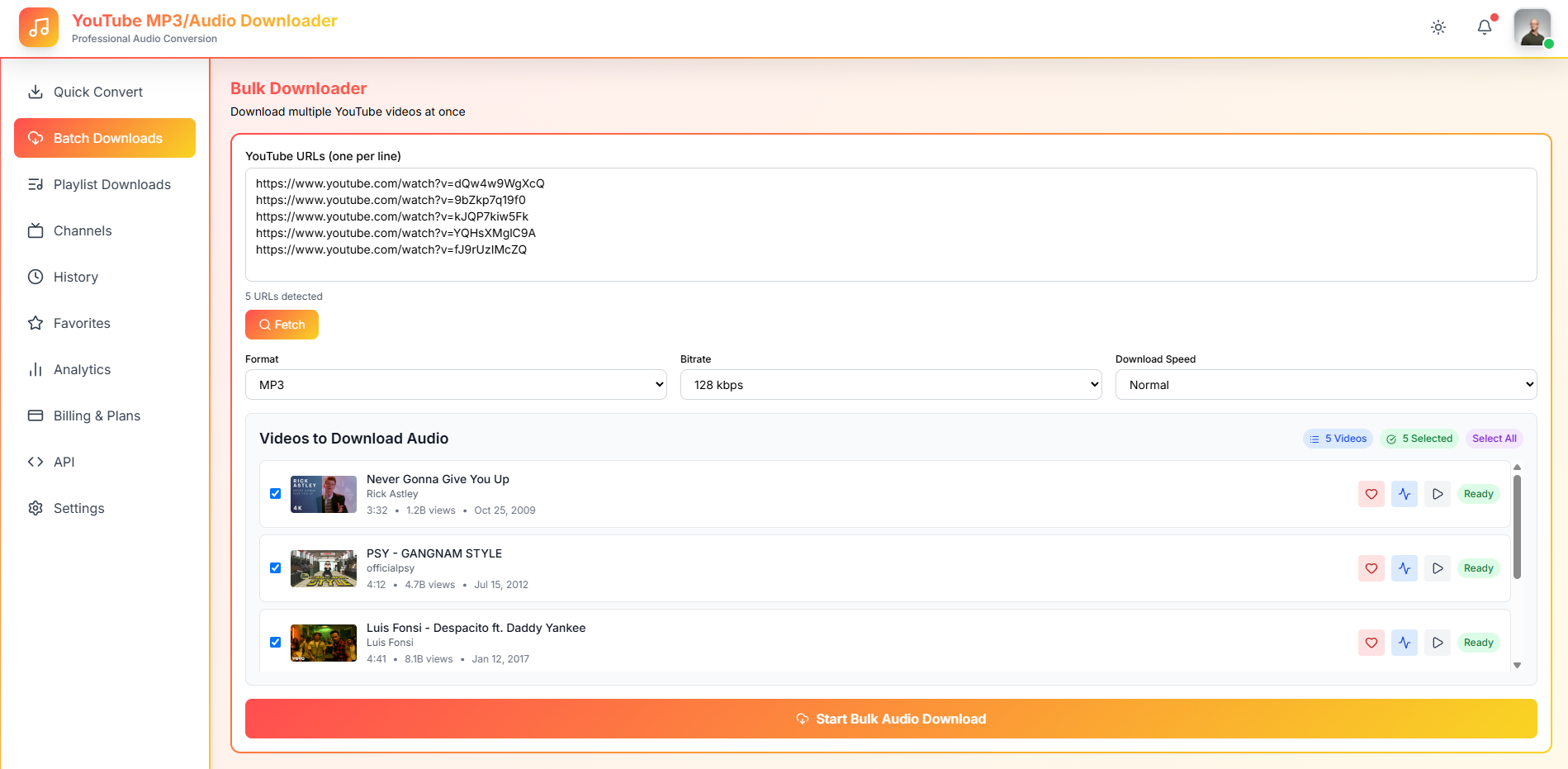
Queue

Queue Management

No need to wait for one file at a time. The Queue feature helps you manage multiple audio downloads more efficiently. Add several links, track their progress, and see which files are waiting, processing, completed, or failed at a glance.

This is especially useful for creators, researchers, and anyone who regularly saves audio content from social media and wants a smoother workflow.

Add multiple downloads at once
Track real-time download progress
View pending, active, and completed tasks
Easily retry any failed downloads
Keep your workflow organized and efficient
Queue Management
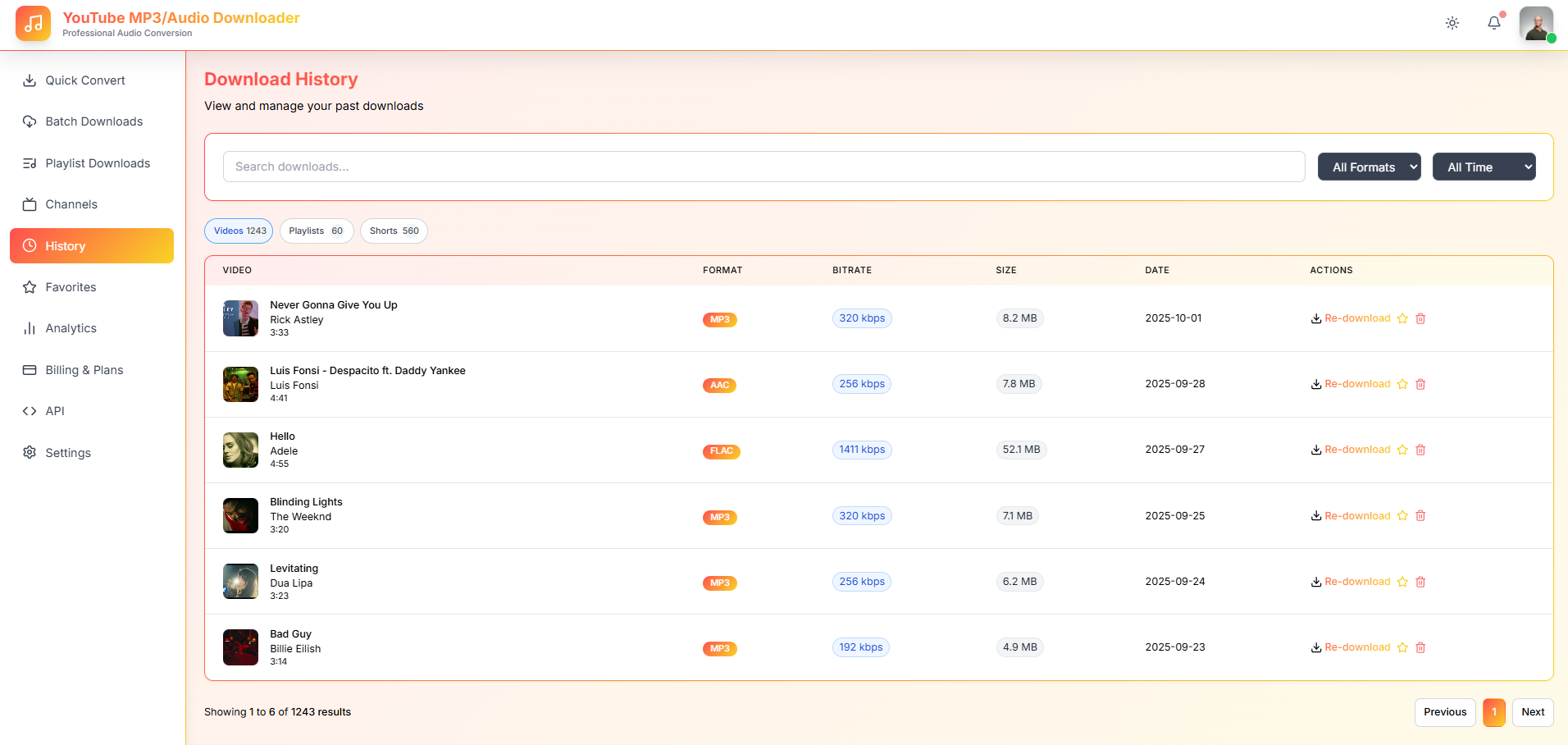
History

Download History

The History section keeps a detailed record of your previous downloads, so you can easily revisit content you saved before. No more wondering what you downloaded or where it came from.

This helps you track what you saved, when you saved it, and which platform it came from — making it easy to find older files without searching everywhere.

Browse your complete download history
Quickly recheck original source links
Find older audio files in seconds
Track your download activity over time
Avoid downloading the same content twice
Download History
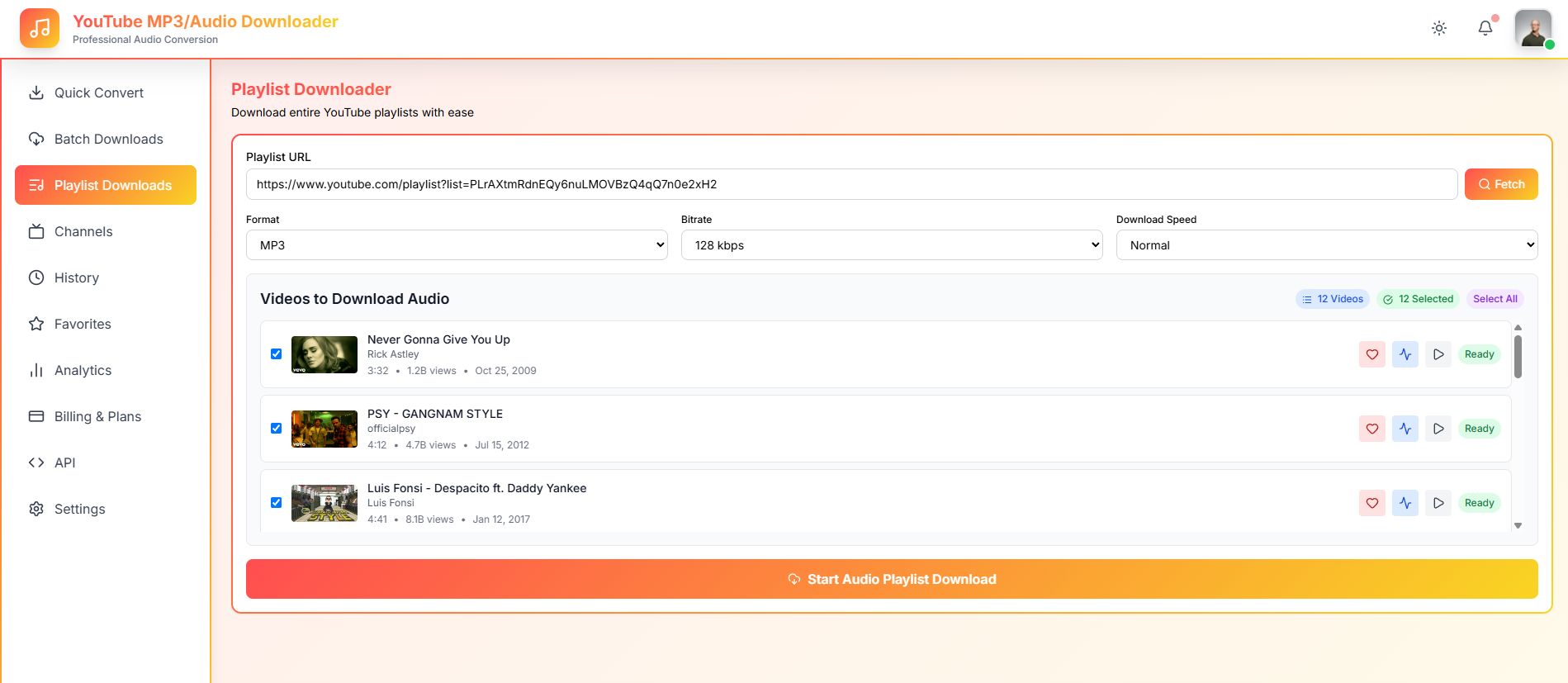
Playlists

Create and Manage Playlists

Use Playlists to organize your audio files by topic, project, mood, client, research area, or content idea. Whether you are collecting motivational clips, educational content, podcast snippets, or music references, playlists make your audio library easy to browse and enjoy.

Group related audio files together so you can always find what you need without digging through your entire library.

Organize study audio and research clips
Build marketing inspiration collections
Save podcast clips by episode or theme
Collect trending sounds and viral audio
Group by client, project, or content idea
Keep your favorite downloads in one place
Create and Manage Playlists
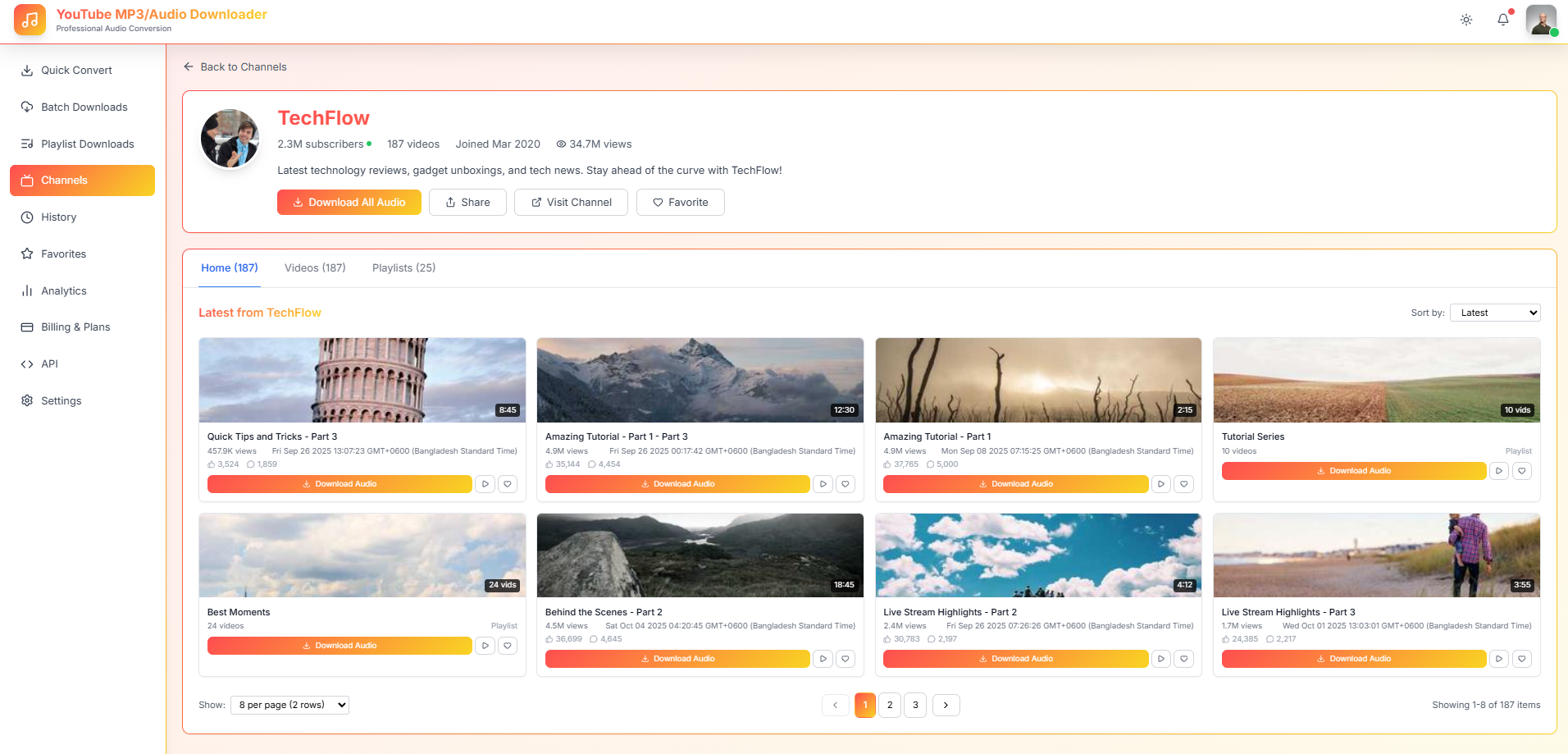
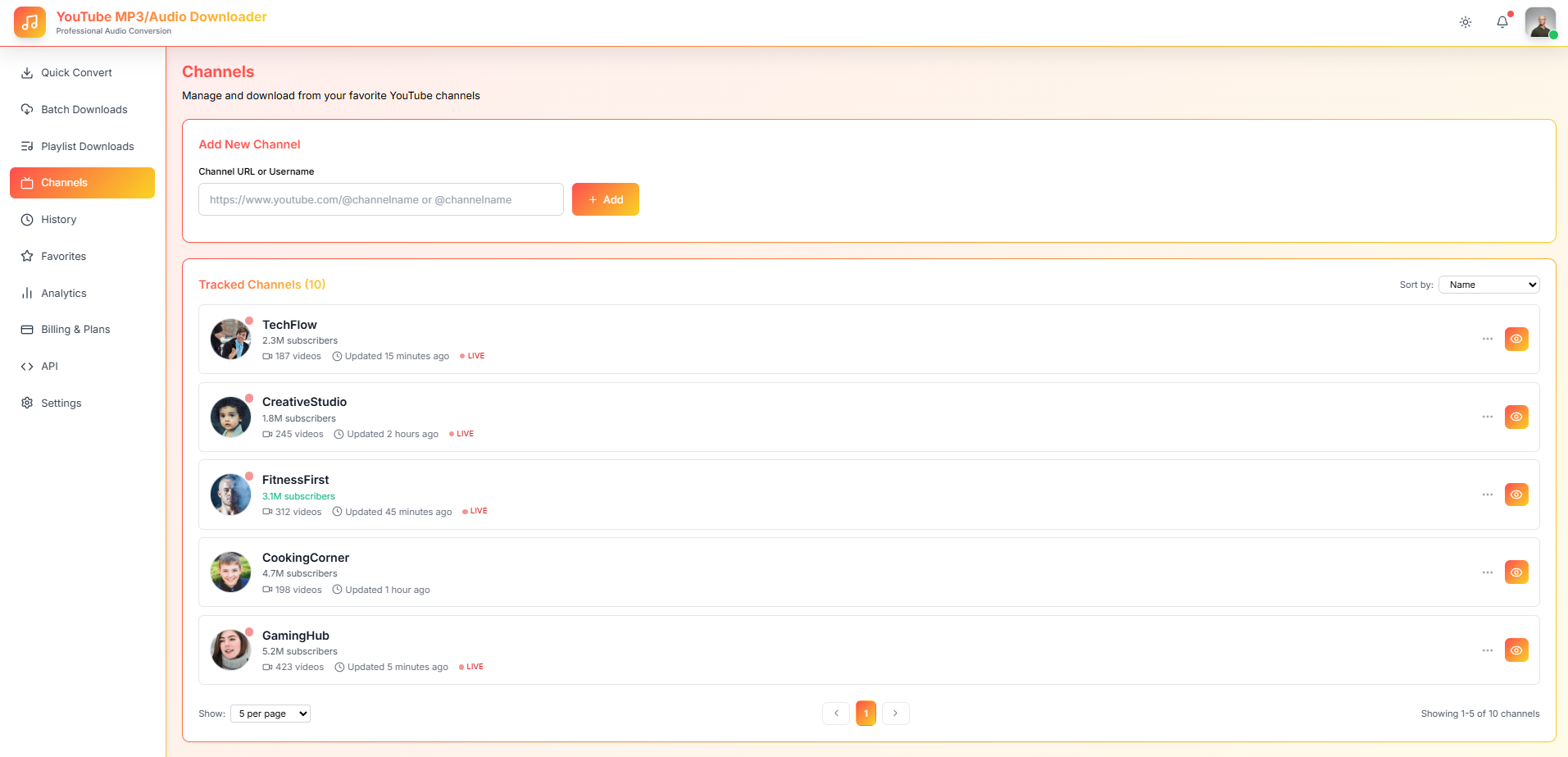
Channels

Save and Follow Channels

The Channels feature helps you organize audio sources from creators, pages, or social media accounts you follow regularly. Instead of searching manually every time, you can keep your favorite channels organized inside YouAudioDown and manage audio content by source effortlessly.

This makes it easy to keep track of which creators you download from and find audio organized by channel.

Save your favorite social media channels
Organize downloads by content source
Track audio from creators you follow
Build channel-based audio collections
Find creator content faster and easier
Save and Follow Channels
Account

Account Management

Your Account area gives you full control over your profile, settings, preferences, and plan details. Update your information, customize your experience, and manage everything related to your YouAudioDown account from one convenient place.

Keep your account secure and your preferences tailored to how you use the platform every day.

Manage your profile and personal details
Update account and notification settings
Control download and interface preferences
View your current subscription plan
Manage security and privacy settings
Account Management
Statistics

Statistics and Insights

The Statistics section gives you a clear view of how you use YouAudioDown. Track your downloads, review your activity, monitor your usage patterns, and understand your audio-saving habits over time with easy-to-read data.

Whether you are a casual user or a power downloader, knowing your stats helps you stay on top of your audio library.

View total downloads across all platforms
Track completed and failed downloads
Monitor download activity over time
See which features you use most
Review storage and usage insights
Statistics and Insights
Simple Workflow

How YouAudioDown Works

Get started with social media audio downloading in five simple steps.

1

Copy a Link

Find the social media video you want and copy its URL.

2

Paste in YouAudioDown

Open the Download section and paste your link into the downloader box.

3

Add to Queue or Download

Process one file immediately or add multiple links to your queue.

4

Save to Library

Your audio is processed and saved, ready to access from your library.

5

Organize with Playlists

Group your audio by playlist, channel, project, or content type.

Why Choose Us

Why Choose YouAudioDown?

More than a downloader — a complete platform for downloading, organizing, and managing social media audio.

More Than a Downloader

YouAudioDown is not just a basic download tool. It is a complete SaaS platform for downloading, organizing, and managing social media audio end to end.

Clean SaaS Dashboard

Enjoy a simple, modern dashboard where every tool and feature is easy to find and navigate without clutter.

Better Organization

Use your library, playlists, history, and channels to keep every audio file structured and easy to find later.

Faster Workflow

Queue multiple downloads at once and manage them without repeating the same steps over and over.

Useful Activity Tracking

Review your download history and statistics so you always know what you have saved and when.

Built for Daily Use

Perfect for creators, marketers, students, researchers, editors, and anyone who saves audio from social media regularly.

For Everyone

Who Can Use YouAudioDown?

Designed for anyone who downloads and manages audio from social media platforms.

Content Creators

Save trending sounds, speeches, references, and audio ideas for future content projects and inspiration.

Social Media Managers

Collect audio from different platforms, channels, or campaigns and keep everything organized by source.

Students and Researchers

Download useful educational audio, lectures, and interviews and organize them by topic or course.

Video Editors

Save reference audio, sound clips, voice overs, and background audio for your editing projects.

Podcast Listeners

Extract podcast-style audio clips from social media videos and listen to them whenever you want.

Everyday Users

Save your favorite audio content from social media and enjoy it offline anytime, anywhere.

Workflow

Built for a Better Audio Downloading Workflow

Everything you need to manage your social media audio from start to finish.

YouAudioDown is designed to make social media audio downloading easier from start to finish. Instead of downloading one file and losing track of it, you can manage everything inside your account.

Your dashboard gives you quick access to downloads, queue, library, history, playlists, channels, account settings, and statistics — all in one place.

This makes YouAudioDown useful for both casual users and people who download audio often.

youaudiodown.com/dashboard
Downloads
1,842
Queue
6
Playlists
12
Lofi Hip Hop Mix Done
Sunset Beach Reel Queued
Testimonials

What Our Users Say

Real feedback from creators, marketers, and everyday users who love YouAudioDown.

"Finally, a social media audio downloader that actually works. No ads, no registration — just paste and download. Couldn't ask for more."
Sarah M.
Content Creator
"The dashboard organization is a game-changer. I can track everything I download and keep my audio files neatly organized by project."
Mike R.
Music Producer
"Love that it's completely anonymous and secure. No signups, no tracking — just a clean tool that does exactly what it promises."
Emma L.
Digital Marketer
"I use YouAudioDown daily to grab podcast clips from YouTube. The queue feature lets me batch multiple downloads and walk away."
James K.
Podcaster
"Playlists changed how I organize my audio. I sort everything by client project now. Saves me hours of searching every week."
Lisa T.
Video Editor
"Simple, clean, and does what it says. No bloatware, no hidden fees, no tricks. This is how free online tools should be."
David P.
Software Engineer
"I download educational content for my students regularly. The audio quality is fantastic and the process is so straightforward."
Prof. Anna W.
Educator
"The channels feature helps me follow my favorite creators. I never miss new audio content from the people I follow."
Chris B.
Fitness Trainer
"Perfect for downloading audio on the go. Works great on my phone and the library syncs across all my devices seamlessly."
Maya S.
Travel Blogger
FAQ

Frequently Asked Questions

What is YouAudioDown?
YouAudioDown is a social media audio downloader SaaS that helps users download, save, organize, and manage audio from social media video links in one clean platform.
What can I do inside the dashboard?
You can access your main dashboard, download audio, manage your queue, view your library, check history, create playlists, organize channels, manage your account, and view statistics.
Can I download multiple audio files at once?
Yes. You can use the queue feature to manage multiple audio downloads simultaneously and track their progress in real time.
Where are my downloaded files saved?
Your downloaded audio files are saved inside your library, where you can access, play, and manage them whenever you need.
Can I organize my audio files into groups?
Yes. You can organize audio using playlists, channels, library folders, and download history to keep everything structured.
Is YouAudioDown useful for content creators?
Absolutely. It is built for creators who want to save trending sounds, references, voice clips, educational audio, or content ideas from social media platforms.
Do I need technical skills to use YouAudioDown?
Not at all. YouAudioDown is designed to be simple. Copy a link, paste it into the downloader, and manage your audio from the dashboard.
Get Started

Start Managing Social Media Audio Smarter

Stop saving audio files in random folders. With YouAudioDown, you can download, organize, track, and manage social media audio from one clean dashboard.